
Product guides
Group members: export a WhatsApp group's member list
Get the members of a WhatsApp group as a CSV file: each member's phone number, their name if it's saved on the phone, and who the admins are. You type the group's name, and one of your connected WhatsApp numbers that is in the group reads its member list. Nothing is posted in the group, and exports don't use your messages.
Who can do it: Owners and Editors start, retry, delete and download exports. Analysts can open every export and see its members, but can't start or download one. Group exports are part of the Standard plan and above (see Plan limits); Lite and the free trial don't include them.
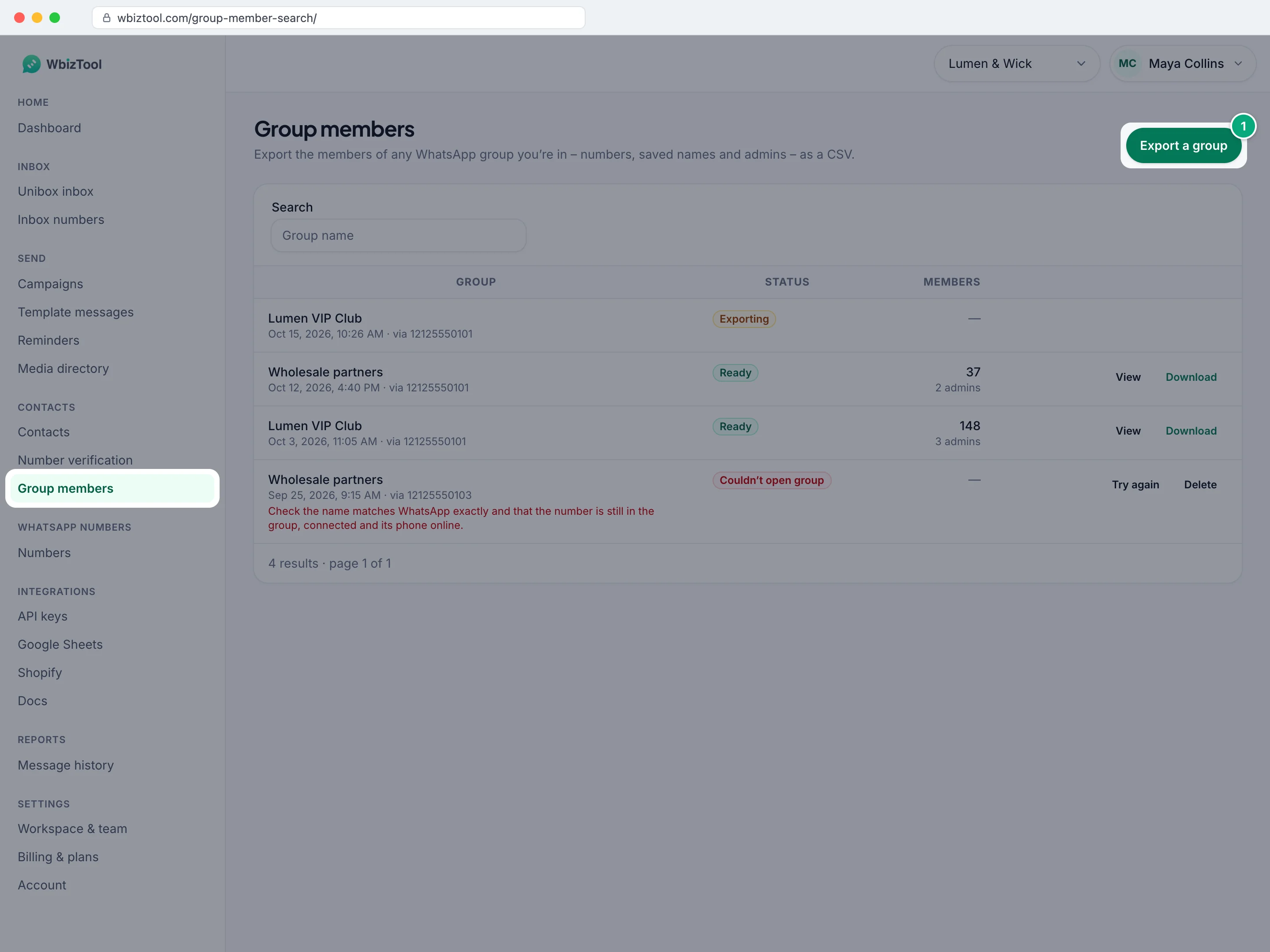
Open Group members under Contacts in the sidebar, or go to /group-member-search/.
Before you start#
- A plan with group exports left this billing period. The export dialog shows them, for example "Your plan includes 50 group exports. 47 exports left this billing period."
- A WhatsApp number that is a member of the group, connected with a QR code or pairing code (it shows Connected on WhatsApp numbers), with its phone on and online. A number connected through the browser extension can't export groups, so the export window doesn't offer it. See Connect your WhatsApp number.
- The group's name exactly as it appears in WhatsApp, emojis and punctuation included. Copying it from WhatsApp is safest.
Export a group's members#
Open the dialog
On Group members, click Export a group at the top right.
Type the group's name
Under Group name, type the name exactly as it appears in WhatsApp, emojis included, such as
Lumen & Wick teamorPune Runners Club 🏃. Capitals don't have to match, see How the group is found.Choose the number
Under WhatsApp number, pick the number that is in the group. The default, First connected number, uses the first connected number in the list, so with several numbers, pick the right one.
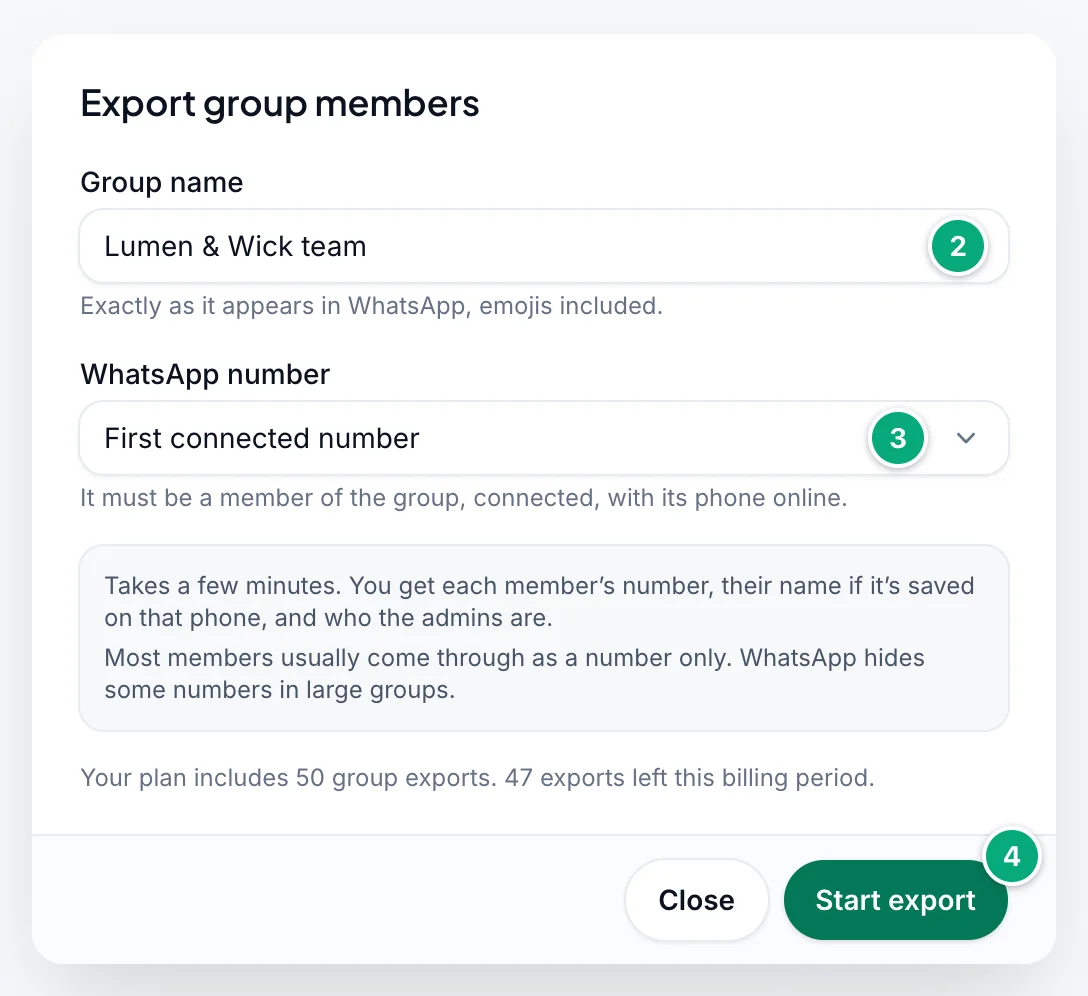
Start the export
Click Start export. You see, for example, "Export of “Lumen & Wick team” started – it usually takes a few minutes.", and the export appears at the top of the list as Exporting.
If none of your numbers is connected, the dialog says "No WhatsApp number is connected. Connect one that’s in the group first." and Start export stays grey. If your plan's exports for this billing period are used up, it says so instead (see Plan limits).
An export takes a few minutes once your number gets to it. It waits while that number is sending messages, for example a campaign, and while it's disconnected. You can close the page: the export goes on. If your number hasn't started it within 24 hours, or the number is removed from the workspace, the export stops as Expired.
Follow an export#
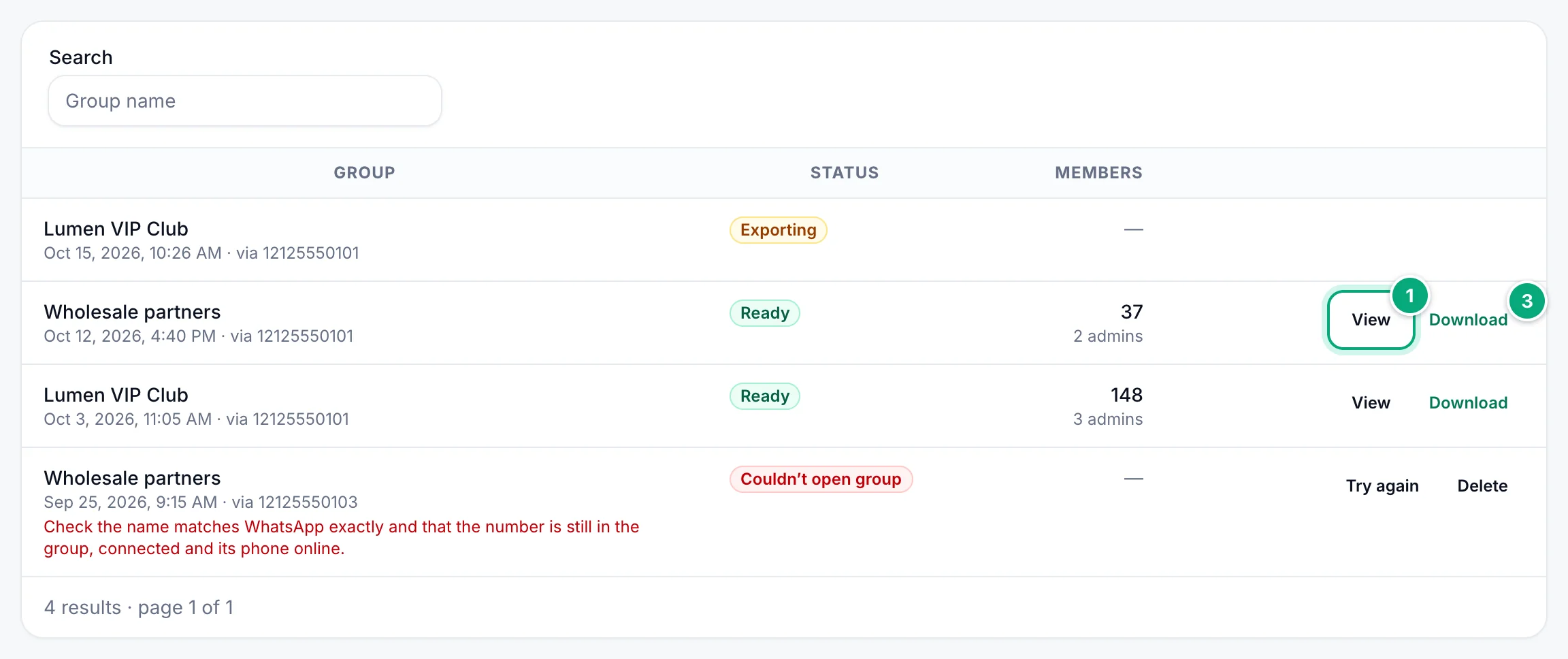
The list shows the workspace's exports, newest first, 25 to a page: the group's name, when the export was started and through which number ("via …"), its Status and, once it's ready, how many members and admins it found. Find one with Search (the group's name). While an export is Exporting, the list updates by itself every 20 seconds.
| Status | Meaning |
|---|---|
| Exporting | Waiting for your number, or reading the group. |
| Ready | The members were read: View them or Download the CSV. If WhatsApp showed only some of the group's members, the row says so, for example "WhatsApp shows 12 of 340 members of this group." |
| Couldn’t open group | No group was opened. The row says "Check the name matches WhatsApp exactly and that the number is still in the group, connected and its phone online." Either no group has exactly that name on that number, or the number or its phone was offline. See Troubleshooting. |
| Failed | The group was opened, but its members couldn't be read. The row says "The export stopped before it finished. Try again in a few minutes." Point at that line to see the technical reason. |
| Expired | Your number didn't start the export within 24 hours, because it was disconnected or busy sending the whole time, or the number was removed. The row says "Not started within 24 hours. Check the number is connected and not busy sending, then try again – expired exports don’t count toward your plan." |
Each export is a snapshot of the group when it ran. For an up-to-date list, export the group again. Exported members aren't added to Contacts.
See and download the members#
Open the export
Click View on a Ready export, or click its name.
Find the members you need
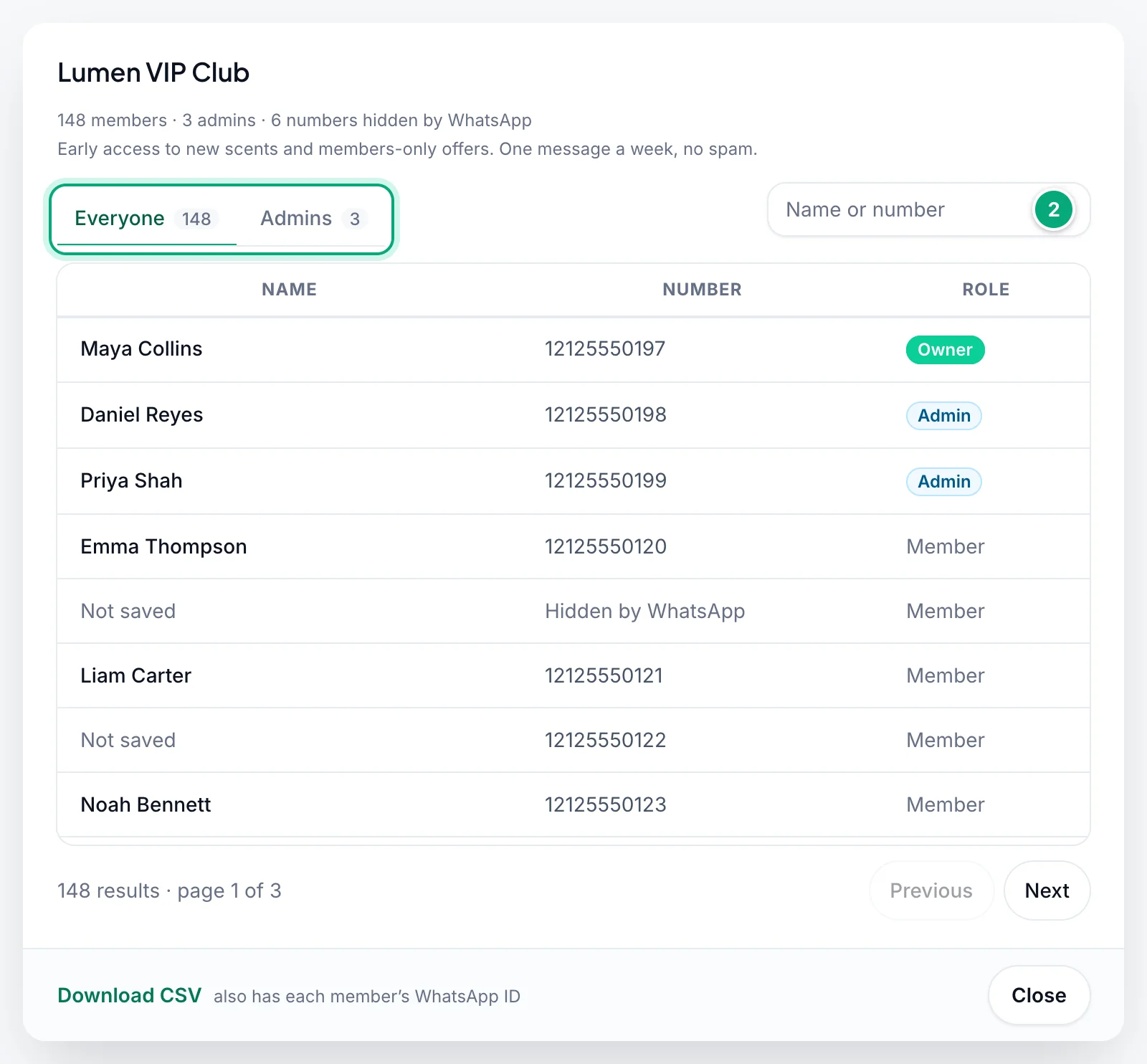
The window shows the group's name and description, and a line such as "148 members · 3 admins · 6 numbers hidden by WhatsApp". Pick Everyone or Admins, each with its count, or type part of a name or number under Name or number. Members are shown 50 to a page.
Download
Click Download on the export's row, or Download CSV at the bottom of its members.
| On the page | What it shows |
|---|---|
| Name | The name saved for the member in the contacts of the phone that exported, or else their WhatsApp profile name. Not saved when there's neither. |
| Number | Their phone number with the country code. Hidden by WhatsApp when WhatsApp doesn't share it, see Names and hidden numbers. |
| Role | Owner (the group's creator), Admin or Member. The Admins tab lists owners and admins. |
Numbers can be searched any way they're written: +1 212 555 0120 finds 12125550120. Text with letters searches the names.
The CSV file#
The file is named after the group and the export, such as group_members_Lumen VIP Club_301.csv. Only the letters A–Z, digits, spaces, - and _ of the group's name are kept, up to 60 characters: emojis and other alphabets are left out, and a name with none of these becomes group. The file has one row per member and these columns:
| Column | Contents |
|---|---|
Name | As on the page. Unknown Contact where the page shows Not saved. |
Phone Number | Digits with the country code, without +, such as 12125550120. N/A when WhatsApp hides the number. |
WhatsApp ID | The member's WhatsApp ID, usually the number followed by @c.us. N/A when WhatsApp hides the number. |
Role | member, admin or super_admin (the page's Owner). |
Is Admin | Yes or No. |
Is Super Admin | Yes for the group's owner, otherwise No. |
- The column names and values are in English, whatever your dashboard language. Names in any alphabet open correctly in Excel and Google Sheets.
- A cell that starts with
=,+,-or@gets a'in front, so the spreadsheet doesn't run it as a formula.
To message the members, add the file in Template messages: Phone Number is picked as the Send to (column), and rows with N/A are skipped. Replace Unknown Contact in the Name column first, or {{Name}} puts it into your messages. Edit it in Google Sheets, or in Excel with Phone Number formatted as Text: otherwise Excel saves long numbers as 1.21256E+10 and Template messages skips those rows.
Names and hidden numbers#
- Names come from the phone of the number that exported: the name saved in its contacts, or else the member's WhatsApp profile name when WhatsApp has it. Many members come through as a number only, shown as Not saved. You can't edit names in WbizTool; change them in the CSV.
- Hidden numbers: WhatsApp hides the numbers of some members, more often in large groups. Pointing at Hidden by WhatsApp shows "WhatsApp hides the numbers of members you don’t share a contact with". These members are counted and keep their role, but have no name and no number, and WbizTool can't reveal them. The line above the members says how many, for example "6 numbers hidden by WhatsApp".
Plan limits#
Your plan sets how many groups you can export each billing period, shown on Pricing, and to Owners on Billing & plans, as group exports:
| Plan | Group exports per billing period |
|---|---|
| Lite | Not included |
| Standard | 50 |
| Advanced | 100 |
| Enterprise | 500 |
- What counts: every export you start, whatever its result, except Expired ones. Try again starts a new export, so it counts too, and deleted exports still count.
- When it renews: the count starts again with each usage period: at each monthly renewal, and every 30 days on yearly and lifetime plans.
- In the dialog: Export group members shows the plan's number and what's left. When nothing is left, it says "You’ve used all 50 group exports your plan includes this billing period. See plans to export more groups." and Start export stays grey.
If your plan has no limit, the dialog doesn't show these lines.
Without group exports in the plan, the page says "Group member export isn’t in your current plan. Past exports stay listed below.", and Export a group and Download are grey. You can still open past exports with View. Owners can click See plans to upgrade.
Try again or delete an export#
- Try again, on Failed, Couldn’t open group and Expired exports, starts a new export of the same name through the same number. It appears at the top as Exporting, with "Exporting “…” again – it usually takes a few minutes.", and the failed one stays in the list. To correct the name or use another number, click Export a group instead.
- Delete is offered on Failed, Couldn’t open group and Expired exports, and on Ready exports that found no members. Click it, then Delete export under "Delete this export?". The export disappears from the list for the whole workspace ("Export deleted.") but still counts toward your plan, unless it had expired. Exports with members can't be deleted.
Both need an Owner or Editor role and group exports in the plan.
How the group is found#
The number you chose opens WhatsApp Web, searches for the name and opens only a chat with exactly that name, then reads the group's member list.
- Spaces at the start and end don't matter. Everything else must match: emojis, punctuation and the spaces between words. A chat whose name only starts with or contains your text is never opened:
Runnersdoesn't openPune Runners Club. - Capitals don't have to match:
pune runners clubopensPune Runners Club, unless two groups differ only in capitals. - The chat must be a group. If only a contact has that name, or a contact and a group share it, nothing is opened.
- If two of the number's groups have the same name, or names that differ only in capitals, rename one in WhatsApp first. Otherwise the wrong one can be exported, or, if your capitals match neither, nothing is opened (Couldn’t open group).
Troubleshooting#
| Message or problem | What to do |
|---|---|
| "Enter the group’s name." | Type the name under Group name. |
| "No WhatsApp number is connected. Connect one that’s in the group first." | Connect a number that's in the group with a QR code or pairing code on WhatsApp numbers. A number connected through the browser extension doesn't count. |
| "That WhatsApp number isn’t connected any more – connect it again or use another number." | The number disconnected while the window was open. Reconnect it, or pick another number. |
| "You’ve used all … group exports your plan includes this billing period." | Wait until your plan renews, or ask an Owner to upgrade (See plans). |
| "Group member export isn’t in your current plan." | An Owner can upgrade to Standard or higher on Billing & plans. |
| "This group is already being exported through that number." | You clicked Try again while that export is still running: wait for it at the top of the list. |
| Export a group is grey | You're an Analyst in this workspace, or the plan doesn't include group exports. Ask an Owner. |
| Download, Try again or Delete is grey (pointing at it says why) | You're an Analyst, or the plan doesn't include group exports. An Owner or Editor can do it for you. |
| "Only the workspace owner or an editor can do this." | Your role changed to Analyst while the page was open. Ask an Owner. |
| Couldn’t open group | Copy the name from WhatsApp and check that the number is still in the group, shows Connected, and its phone is on and online. Also check that no chat with a person on that phone has the group's name; rename the contact if so. Then click Try again, or start a new export if the name was wrong. |
| "WhatsApp shows 12 of 340 members of this group." | WhatsApp showed your number only part of the members. This happens in a community's announcements when your number isn't an admin there. The export has the members WhatsApp showed; a number that's an admin of the group may see more. |
| Failed | Point at the red line to see why. Group "…" not found means WhatsApp has no group with exactly that name: check the spaces between words and the emojis, then start a new export. Otherwise, click Try again after a few minutes, and contact support if it fails again. |
| Stays Exporting for hours | The number must show Connected: exports wait while it's disconnected or sending messages, and expire after 24 hours. If it's connected and idle and the export still doesn't move, contact support. |
| Expired | Make sure the number shows Connected and isn't sending a campaign, then click Try again. If the number was removed, start a new export with another number. Expired exports don't count toward your plan. |
| Many members show Not saved | Names come only from that phone's contacts and WhatsApp profile names, see Names and hidden numbers. |
Hidden by WhatsApp, or N/A in the CSV | WhatsApp doesn't share these numbers, so they can't be exported. |
| The wrong group was exported | Two groups have the same name, or names that differ only in capitals. Rename one in WhatsApp and export again. |
| "This export no longer exists – it may have been deleted." | Someone deleted it, or the link belongs to another workspace: check the workspace picker at the top of the dashboard. |